How to Check If an APK Is Safe – Safety Guide 2026
10 September 2026
2026 Guide
Description
Downloading APK files can be a convenient way to install Android apps that may not be available through your usual app store. However, not every APK found online is trustworthy. Some files may be outdated, modified, fake, or potentially harmful to your device and personal information.
That is why it is important to know how to check if an APK is safe before installing it. A few simple checks can help you understand where the file came from, who developed it, what permissions it requests, and whether there are any warning signs.
In this guide, we will cover the most important APK safety checks, including trusted download sources, malware scanning, APK permissions, modified files, fake websites, Android security, and account protection. By following these steps, you can make a more informed decision before installing an APK on your Android device.
How to Check If an APK Is Safe Before Installing
Downloading an APK gives Android users another way to install applications, but it also means taking extra responsibility for security. Unlike apps obtained directly from an official app store, APK files downloaded from websites need to be checked carefully before installation.
The good news is that checking an APK does not have to be complicated. By looking at the download source, developer information, file details, permissions, security warnings, and application behavior, you can make a much more informed decision.
In this guide, you will learn how to check if an APK is safe before installing it and what warning signs you should never ignore.
What Makes an APK Safe?
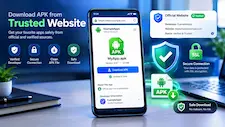
An APK should come from a source that can be reasonably trusted and should match the application information provided by the legitimate developer or publisher.
Safety depends on several factors rather than one single test.
Before installing an APK, consider:
- Where did the file come from?
- Who developed the application?
- Is the version information available?
- Does the file appear genuine?
- Are the requested permissions reasonable?
- Can the file be scanned for malware?
- Does Android display a security warning?
- Does the application request unnecessary personal information?
The more information you can verify, the better your decision will be.
1. Check the APK Download Source
The first thing to investigate is the website where you found the APK.
A trustworthy-looking download page should provide useful information about the application instead of simply displaying a download button.
Look for:
- Developer or publisher information
- Official application name
- Version number
- APK size
- Android requirements
- Update information
- Privacy information
- Clear installation instructions
Be careful with websites that constantly redirect you, open unwanted tabs, or use misleading buttons.
Check the Website Domain
Fake APK websites may use domain names that look similar to legitimate websites.
Before downloading, carefully check the spelling of the domain. A small difference in a website address can lead you to an entirely different service.
Whenever possible, compare the website with the developer’s known official channels.
2. Verify the Developer
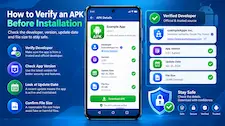
Knowing who created the APK is another important safety step.
If an application belongs to a known developer, compare the developer name shown on the APK page with information from a reliable source.
Be cautious when:
- The developer name is missing.
- The developer information looks copied.
- The website gives conflicting information.
- The application claims to be official but cannot verify its publisher.
A familiar application name does not automatically mean that the APK is genuine.
3. Check the APK Version
Look at the version number before installation.
If the website provides an extremely old version, check whether a newer legitimate version is available.
An outdated APK may have compatibility problems or miss important security improvements.
At the same time, do not assume that the newest-looking version is automatically safe. Version information should be considered together with the source and developer details.
4. Check the APK File Size
The APK file size can provide another useful clue.
If the website lists the expected file size, compare it with the file you downloaded.
A major difference does not automatically mean that the APK is malicious. Different versions and builds can have different sizes. However, an unusual file size is a good reason to investigate further.
Never use file size alone as proof of safety.
5. Scan the APK for Malware

One of the most useful steps in an APK security check is scanning the file before installation.
A reputable antivirus or security service may detect known malicious files or suspicious components.
The basic process is:
- Download the APK without installing it.
- Locate the downloaded file.
- Use a reputable security tool to scan it.
- Review the result.
- Investigate any warning before continuing.
Keep in mind that a clean scan does not provide a 100% guarantee that an APK is completely safe.
Security scanning is one layer of protection, not the entire verification process.
6. Review APK Permissions
Permissions can tell you a lot about an application.
Before installation, consider what access the app may need.
Common permissions include:
- Camera
- Microphone
- Location
- Contacts
- Photos and media
- Notifications
- Storage
Think about whether each permission makes sense.
For example, a navigation app may reasonably require location access. A camera application may need camera access. But a basic application requesting several unrelated permissions deserves closer attention.
Don’t Automatically Allow Everything
When Android gives you permission controls, review them carefully.
Only provide access that is necessary for the application’s legitimate functionality.
You can also review permissions later through Android’s application settings.
7. Watch for Modified APKs
Modified APKs have been changed from their original version.
They may be advertised with terms such as:
- MOD APK
- Premium Unlocked
- Pro Unlocked
- Cracked APK
- Unlimited Features
These versions can be tempting, but users may not know exactly what changes were made to the original application.
Additional code could introduce privacy or security risks.
If you want the safest possible experience, prefer an original version from a trustworthy source whenever available.
8. Be Careful With Cracked APKs
Cracked APKs deserve additional caution because they often promise access to paid features without the normal payment or restrictions.
The problem is that the user may not know what has been changed.
Potential risks include:
- Hidden unwanted software
- Excessive advertisements
- Fake login screens
- Data collection
- Unnecessary permissions
- Account-security problems
A free feature is not worth compromising your device or personal information.
9. Check Android Security Warnings
Android may display security warnings when you attempt to install an APK from outside your normal app marketplace.
Do not automatically ignore these warnings.
Read what Android is telling you and consider whether you can verify the source of the application.
If a website specifically tells you to disable multiple security features just to install its APK, stop and investigate the situation carefully.
Security warnings should be treated as useful information rather than an inconvenience.
10. Look for Fake APK Websites
A fake APK website can make a malicious file look legitimate.
Some common warning signs include:
Too Many Download Buttons
A page may contain several buttons that appear to be downloads. Some could actually lead to advertisements or unrelated websites.
Aggressive Pop-Ups
Repeated pop-ups and automatic redirects are reasons to be cautious.
Fake Virus Alerts
A website may claim that your Android device has been infected and ask you to download another application.
Do not trust random webpage warnings automatically.
Missing Information
If the site provides an APK but gives almost no information about the developer, version, permissions, or application, consider another source.
11. Check the APK Before Entering Login Details
An APK can appear normal while still presenting an account-security risk.
Be especially careful if the application asks you to log in.
Before entering your password, confirm that:
- The application is legitimate.
- The developer can be verified.
- The login page belongs to the expected service.
- You are not being redirected to an unknown website.
Never share passwords or verification codes with another person claiming to provide technical support.
12. Protect Your Personal Data
APK safety also involves privacy.
Think carefully before giving an application access to sensitive information.
Avoid entering unnecessary:
- Passwords
- Banking information
- Payment details
- Authentication codes
- Personal information
If an app requests information that does not appear necessary for its core functionality, investigate why.
13. Keep Your Android Device Updated
Your APK security practices should be combined with general Android security.
Install available Android security updates when possible.
Also keep your browser and important applications updated.
Security updates can address known vulnerabilities and improve overall device protection.
Using an outdated operating system can increase security risks regardless of where your APK came from.
14. Monitor the APK After Installation
Your security check should not end after installation.
Pay attention to how the application behaves.
Possible warning signs include:
- Unexpected pop-ups
- Excessive advertisements
- Strange notifications
- Unusual battery drain
- High mobile data usage
- Frequent browser redirects
- Unknown applications appearing
- Unexplained account activity
One unusual event does not automatically prove that an APK is malicious, but repeated suspicious behavior should be investigated.
15. What to Do If an APK Looks Unsafe
If you become uncomfortable with an APK before installation, simply do not install it.
If you have already installed it and notice suspicious behavior:
- Stop using the application.
- Review its permissions.
- Uninstall it if appropriate.
- Run a security scan.
- Check your device for unfamiliar applications.
- Change important passwords if you entered them into the suspicious app.
- Enable additional account security where available.
Acting quickly can reduce potential damage.
APK Safety Checklist
Before installing any APK, use this quick checklist:
Source Check
- Is the website trustworthy?
- Is the domain correct?
- Is the developer identified?
File Check
- Is the APK version available?
- Does the file size seem reasonable?
- Can you scan the file?
Permission Check
- Does the app need the requested permissions?
- Is it asking for unrelated access?
Security Check
- Does Android show a warning?
- Is your device updated?
- Is security software enabled?
Account Check
- Is the login system legitimate?
- Are you being asked for unnecessary sensitive information?
If several things seem suspicious, don’t install the APK.
Is Every APK Download Unsafe?
No.
APK is simply the Android application package format. The file format itself does not mean that an application is malicious.
The important factors are source, authenticity, modifications, permissions, security checks, and application behavior.
A careful user can reduce unnecessary risk by verifying these details before installation.
APK Safety for Gaming Apps
Gaming applications should also be checked before installation.
Gaming APKs deserve the same security attention as any other application. If you are exploring different APK Games & Apps in Pakistan, it is important to check the developer, download source, app permissions, version information, and privacy details before installation.
Before installing a gaming APK, verify:
- Developer information
- Download source
- Application version
- Permissions
- Privacy information
- Account requirements
- Age restrictions
- Regional availability
Avoid applications that make unrealistic claims about guaranteed income or guaranteed profits.
Users should always follow applicable laws, age requirements, location restrictions, and the terms of the service.
Frequently Asked Questions
How do I know if an APK is safe?
Check the source, developer, version, file details, permissions, and scan the APK with reputable security software where possible.
Can I scan an APK for malware?
Yes. Reputable security software and malware-scanning services can be used to check downloaded APK files.
Are APK files automatically dangerous?
No. APK is a standard Android application format. The safety of an individual file depends on its source and contents.
Are MOD APKs safe?
There is no general guarantee. Because modified APKs have been changed from their original versions, they should be treated with additional caution.
Should I install an APK if Android shows a warning?
Investigate the warning first. Do not automatically bypass security warnings without understanding why they appeared.
Can a fake APK steal passwords?
A malicious application may attempt to collect credentials or display fake login pages. Verify the application’s legitimacy before entering sensitive information.
Is an APK scanner enough?
No. Scanning should be combined with source verification, permission checks, Android updates, and general security awareness.
What is the safest way to download an APK?
Use a trustworthy source, verify the developer, check the file details, scan it where possible, review permissions, and monitor the app after installation.
What should I do with a suspicious APK?
Do not install it. If it is already installed, consider uninstalling it, scanning your device, reviewing permissions, and securing any accounts that may have been exposed.
Final Thoughts
Knowing how to check if an APK is safe before installing can help Android users avoid many common security and privacy problems.
Start by checking the source and developer. Then verify the version and file information, scan the APK where possible, review permissions, and pay attention to Android security warnings.
Don’t overlook modified APKs, cracked applications, fake download buttons, or suspicious login pages.
Most importantly, remember that no single test can guarantee that an APK is completely safe. A better approach is to combine several security checks before installation.
Verify first, install second.
This simple habit can make APK downloading safer and help you make better decisions about the applications you install on your Android device
A reliable APK website should provide clear app information and safety guidance for users exploring APK Games & Apps in Pakistan.
APK Games